
Table of Contents
- What is an e-signature audit trail?
- What does an e-signature audit trail record?
- Why does an e-signature audit trail matter?
- Is an audit trail legally required for every e-signature?
- What can an audit trail not prove by itself?
- How do you evaluate an e-signature audit trail?
- How do you review and download an audit trail in SignQuick?
- Research sources
E-Signature Audit Trails: What They Record and Why They Matter
An e-signature audit trail is a chronological record that connects a document to the people, actions, and timestamps in its signing process. It helps answer what was sent, who participated, what each person did, when the workflow changed, and which completed file belongs to that record.
The signed PDF and the audit trail do different jobs. The PDF preserves the completed content. The audit trail preserves context about the process. Keep them together, and do not assume either one automatically proves identity or makes an agreement enforceable.
What is an e-signature audit trail?
NIST defines an audit trail broadly as a chronological record that supports reconstruction and examination of events around a transaction. In e-signing, that idea becomes a document-specific timeline: creation, delivery, viewing, consent, signing, completion, decline, or another terminal outcome.
Providers use different names, including audit trail, audit log, audit report, signing record, and certificate of completion. The label matters less than the contents. Adobe's current Acrobat Sign documentation, for example, lists agreement creation, sent email, recipient views, signatures, approvals, and terminal status among possible milestones. Other products expose a different set or reserve more detailed fields for particular plans.
What does an e-signature audit trail record?
A strong audit trail connects five kinds of evidence. No single field carries the whole story.
| Record | What it can help establish | Important limit |
|---|---|---|
| Document identity: ID, title, file name, version, original and signed hashes | Which file the timeline describes and whether compared file bytes match | A hash mismatch detects a difference; it does not explain who changed the file or why |
| Participants and routing: sender, organization, recipients, signing order, CC recipients | Who was invited and how the workflow was arranged | An email address alone does not prove who controlled the inbox or device |
| Timestamped events: created, sent, viewed, signed, completed, declined, voided, reminders | The order and timing of recorded activity | A timestamp is only as useful as the system and time source that produced it |
| Signer context: status, email, IP address, user agent, authentication or location data | Circumstances surrounding a signer event | IP and device data are contextual, not definitive identity proof |
| Consent and intent: disclosure shown, acceptance, intent-to-sign confirmation, text version | What acknowledgment the workflow recorded and when | A logged click cannot decide capacity, authority, understanding, or coercion |
Some reports also include delivery results, field interactions, time spent reviewing, downloads, a retention date, or a third-party timestamp. Treat those as provider-specific fields, not a universal standard.
Document hashes and version evidence
A cryptographic hash is a repeatable fingerprint calculated from a file's bytes. If the original upload and completed PDF have stored SHA-256 hashes, the audit record can identify each exact file. Later, the platform can recalculate a hash and compare it with the stored value.
Matching values support the conclusion that the compared bytes are unchanged. Different values show that the files differ. A hash alone does not tell you whether a change was authorized, harmless, accidental, or fraudulent, so investigate the source file, signed file, event history, and storage chain together.
IP addresses, devices, and location
An IP address can connect an event to the network address seen by the service. A user-agent string can describe the reported browser and operating system. Approximate IP location or browser-provided coordinates may add context when collected lawfully and with the appropriate permission.
These fields are useful but easy to overstate. Offices share public IPs. Mobile addresses change. VPNs alter apparent location. Another person may have access to the same device or inbox. Use this data as part of the record, not as a substitute for an identity method appropriate to the transaction.
Consent, intent, and authentication
An electronic mark is more meaningful when the record connects it to a person's intent to sign. A platform may preserve the disclosure or acknowledgment presented, its version, the acceptance time, and the authentication step used before signing.
Authentication and audit logging are separate questions. Email-link access, a passcode, account login, or stronger identity verification can change the confidence level, but the audit report should say what actually happened. Do not infer multi-factor authentication, identity verification, or certificate use merely because a report lists a name and email.
Certified timestamps
Ordinary application timestamps come from the platform's systems. A successful RFC 3161 timestamp adds a response from a Time-Stamp Authority that binds a data imprint to a time. The RFC describes this as evidence that data existed before a particular time.
That extra evidence does not certify every fact in the agreement or replace review of the timestamp authority, token, hash, and verification result. A report should distinguish a successful external timestamp from a failed or unavailable request.
Why does an e-signature audit trail matter?
The practical value is reconstruction. Months after a project ends, the sender may remember only that “the contract was signed.” A usable record can answer more precise questions:
- Which PDF was sent?
- Were all intended recipients included?
- Did the request reach the viewed, signed, completed, declined, or voided stage?
- Which signer acted first in a sequential workflow?
- What consent or authentication step did the system record?
- Do the retained signed-file bytes still match the recorded hash?
That helps with everyday operations before any dispute exists. A freelancer can diagnose a stalled request. A small business can retain the completed agreement with its supporting record. A reviewer can distinguish a draft from the completed file instead of reconstructing the process from an email thread.
An audit trail can also support an evidence analysis, but avoid the common shortcut that it “proves legality.” In U.S. federal court, Federal Rule of Evidence 901 asks for evidence sufficient to support a finding that an item is what the proponent claims, and one example is evidence describing a process or system that produces an accurate result. Authentication is still fact-specific, and other rules and objections may apply.
Is an audit trail legally required for every e-signature?
No single rule makes the same audit-trail fields mandatory for every electronic signature and jurisdiction. Requirements depend on the document, transaction, applicable law, industry, and records policy.
For transactions within its scope, the U.S. ESIGN Act generally prevents a signature, contract, or record from being denied legal effect solely because it is electronic. The statute also addresses access and reproducibility when a law requires a record to be retained or provided in writing. The Uniform Electronic Transactions Act separately addresses attribution by considering the efficacy of security procedures and the surrounding circumstances, and it includes requirements for retaining an accurate, accessible record when another law requires retention.
Those rules explain why process and record quality matter. They do not say that a generic certificate containing an IP address makes every contract valid. Documents can be excluded from electronic-signature laws, parties can lack authority, consent can be disputed, and special execution or retention rules can apply. Seek qualified local advice for regulated, high-value, disputed, or cross-border matters.
What can an audit trail not prove by itself?
An audit trail is evidence generated by a system, not a verdict. By itself, it generally cannot decide:
- whether the person named was the only person with access to the email, device, or network;
- whether a representative had authority to bind a company;
- whether the parties understood or voluntarily accepted the terms;
- whether the document type permits the electronic method used;
- whether the agreement is complete, lawful, or enforceable; or
- whether every relevant fact occurred outside the platform.
Be skeptical of phrases such as “court-proof,” “tamper-proof,” or “automatically compliant.” Ask what controls and data support the phrase, who can change the underlying records, how the exported report is generated, and how you can verify the completed file later.
How do you evaluate an e-signature audit trail?
Before choosing a provider, run a harmless test document from upload through completion. Then inspect the resulting report with this checklist:
- Document link: Does the report identify the exact original and completed files with IDs, versions, or hashes?
- Event coverage: Does it distinguish sent, delivered, viewed, signed, declined, voided, and completed events instead of showing only the final signature?
- Participant detail: Can you tell which event belongs to which recipient and how signing order worked?
- Time clarity: Are timestamps precise, ordered, and labeled with a time zone or trustworthy external time source?
- Consent and authentication: Does the record say which disclosure, intent step, or authentication method was actually used?
- Export and verification: Can an authorized user download a durable report and verify the signed document later?
- Retention and access: How long are the document and report available, who can access them, and what happens after account closure?
- Plan limits: Which fields are included in your actual tier? Do not evaluate a basic plan from an enterprise sample report.
- Privacy: Does the report collect only justified data, disclose sensitive fields appropriately, and restrict access?
Save the test report. Marketing pages change; the generated artifact shows what the workflow produced for your account at that time.
How do you review and download an audit trail in SignQuick?
SignQuick publishes this guide and provides e-signature audit trails, so we have a product interest in the topic. The checklist above is intentionally provider-neutral and should be applied to SignQuick too.
For a completed SignQuick document:
- Open Documents and select the document.
- Review the on-page activity timeline for sent, viewed, signed, completed, declined, reminder, or CC events that occurred.
- Select Download Audit Trail to export the audit record as a PDF.
- Download the signed PDF and keep it beside the audit-trail PDF.
- Use the verification link or QR code to review the document status and available original/signed SHA-256 hashes.
- If a retained file no longer matches its recorded hash, preserve both copies and investigate instead of overwriting the evidence.
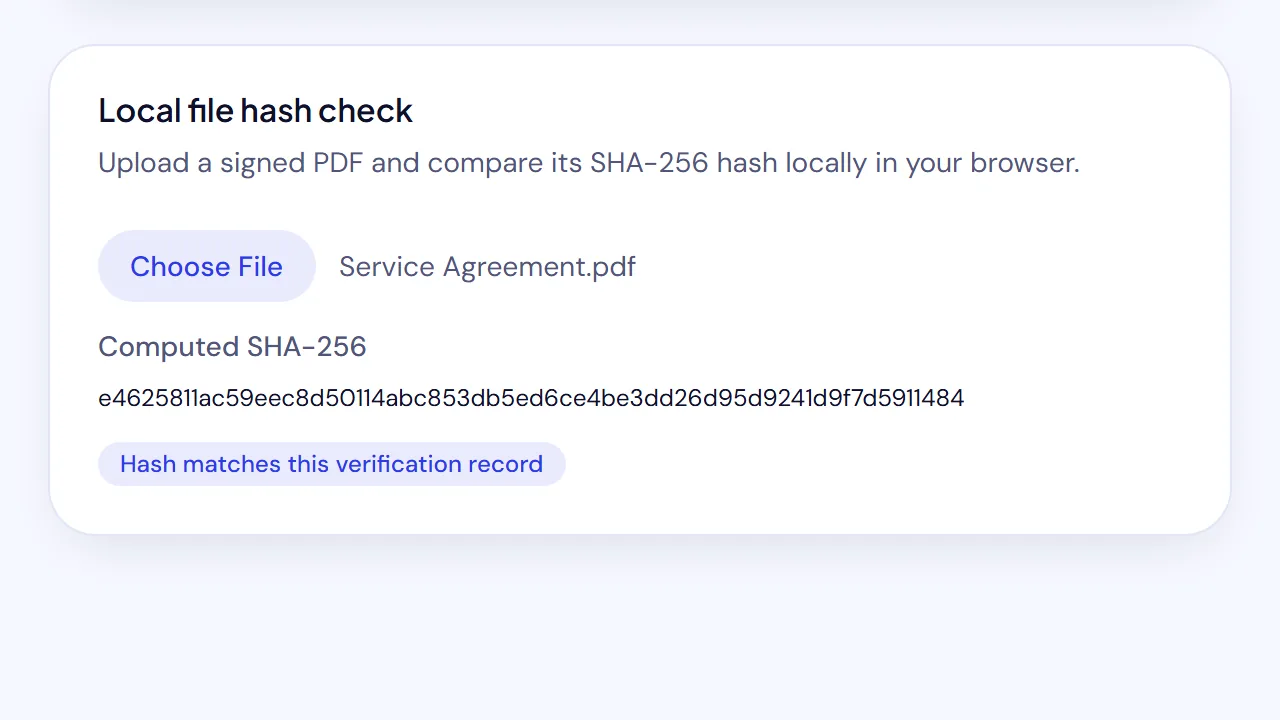
The help center keeps a short version of these steps in Download a signed PDF and its audit trail.
The generated SignQuick report identifies the document, creator, organization, recipients, signing order, event timeline, completion state, and available hashes. Depending on the account tier and the data produced by the workflow, it can also include IP and user-agent context, consent records, location evidence, review telemetry, CC notification, retention information, and the status of an RFC 3161 timestamp request. Missing, unavailable, denied, or failed evidence should remain labeled as such rather than silently treated as successful.
For the broader signing workflow, read what makes an e-signature legally binding. If you want to inspect the output yourself, create a free SignQuick account and complete a harmless sample document before using any provider for an important agreement.
Research sources
- NIST Computer Security Resource Center: Audit trail glossary
- Uniform Law Commission: Uniform Electronic Transactions Act
- 15 U.S.C. § 7001 — General rule of validity
- Federal Rule of Evidence 901 — Authenticating or identifying evidence
- RFC 3161 — Internet X.509 Public Key Infrastructure Time-Stamp Protocol
- Adobe Acrobat Sign: Configure the content of audit reports
Sources and live English and Spanish search results checked September 7, 2026. This article provides general educational information, not legal advice.
Frequently asked questions
What is an e-signature audit trail?
An e-signature audit trail is a chronological record of events and evidence connected to a signing process. Depending on the platform, it can identify the document, participants, sent and viewed events, signatures, timestamps, consent records, IP or device details, completion status, and file-integrity data.
What does an electronic signature audit trail record?
A useful audit trail commonly records the document ID and version, sender and recipients, event timestamps, signer status, consent or intent records, and completion. Some platforms also record IP addresses, user agents, approximate location, document hashes, external timestamps, authentication steps, reminders, declines, and downloads. Contents vary by provider and plan.
Is an audit trail the same as the signed PDF?
No. The signed PDF contains the completed document and visible entries. The audit trail is the related event and evidence record. Keep both, because the audit trail should identify the document it describes and the signed PDF preserves the agreed content.
Does an audit trail make an e-signature legally binding?
Not by itself. An audit trail can support questions about process, attribution, intent, timing, and document integrity, but enforceability depends on the transaction, parties, authority, consent, document type, governing law, evidence, and any required formalities.
Can an IP address prove who signed a document?
An IP address is contextual evidence, not conclusive identity proof. It can associate an event with a network connection, but shared networks, VPNs, mobile carriers, and device access limit what it proves. Evaluate it with email delivery, authentication, consent, timestamps, and the rest of the record.
How should I store an e-signature audit trail?
Download the completed signed PDF and its audit-trail PDF together, keep clear filenames, preserve the original files, follow the retention period that applies to your records, and restrict access because audit reports may contain personal or security-relevant data.
